What you're playing
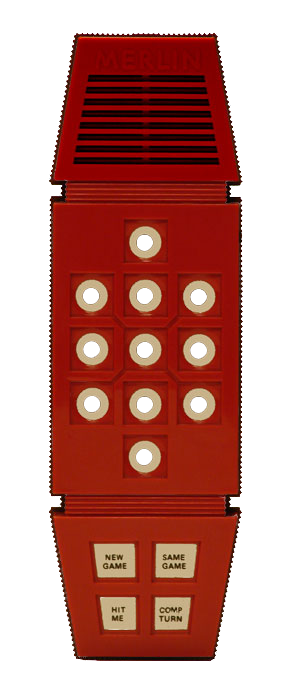
This page is running the original Merlin game code. Merlin — the red plastic handheld from 1978, made by Parker Brothers and designed by Bob Doyle — packs six games into one wand: Tic-Tac-Toe, Music Machine, Echo, Blackjack 13, Magic Square and Mindbender. None of them are re-implemented here; the unmodified ROM is executing, exactly as it did on the original chip.
I got a Merlin for Christmas 1978. I couldn't wait to play it — and, like most of my toys, I couldn't wait to take it apart. This is the same code that was inside the one I opened up, now running in your browser.
The chip
Merlin's brain is a Texas Instruments TMS1100 (mask part MP3404), a member of the TMS1000 series — the line Texas Instruments introduced in 1974 and one of the first single-chip microcontrollers ever shipped. It grew directly out of TI's early-1970s calculator-on-a-chip work: the silicon that made pocket calculators cheap was generalized into a tiny programmable computer.
That cheap little computer is what made the whole late-70s electronic-toy boom possible. The same family powered Milton Bradley's Simon and Big Trak, TI's own calculators and Speak & Spell, and a wave of handheld games. Before it, "intelligence" in a toy meant custom logic; after it, the intelligence was just software on a part that cost pennies.
Why it was an extraordinary idea
- A whole computer on one die — CPU, program ROM, data RAM and I/O together (Harvard architecture), at a time when a "computer" was a board or a box.
- Mask ROM — the program is etched into the silicon at the factory. Unchangeable, nearly free at volume. The game is the chip. That's why running the original ROM means something: it's the literal 1978 program.
- 4-bit, ~350 kHz, no crystal — a resistor and capacitor set the clock (cost again), about 58,000 instructions a second.
- No interrupts, no timers, no DMA, a one-deep call stack, and a program counter that counts in a scrambled LFSR order to save transistors. Display multiplexing, button scanning, sound, and game AI are all hand-timed software loops.
The leap: computation became effectively free for consumer products. Merlin isn't clever circuitry — it's a general-purpose processor running a program. It quietly predicts the microcontroller-in-everything world we live in now.
How this works
The TMS1100 is interpreted in Go: an instruction
decoder executes the unmodified original MP3404 ROM
(2 KB, SHA1 76ca36…0229 — the same dump MAME
uses). Every LED, tone and game behaviour emerges from
running that 1978 code one instruction at a time. The Go core is
compiled to WebAssembly and verified
bit-for-bit against a C++ reference across 200,000 instructions.
The sound
Merlin has no sound chip. The ROM toggles a single output pin inside timing loops; that pin drives a transistor and a small speaker. The pitch is how fast the loop flips the pin; the rhythm is how many times it loops. The music is literally the processor stalling at audible frequencies (Merlin's three-level volume is three outputs tied together).
So we don't synthesise notes or play samples. Every emulated instruction we read that speaker pin and feed its 1-bit state into a resampler that turns the ~58 kHz stream into 44.1/48 kHz audio for the browser. Because the CPU timing is faithful, the pitches and rhythms come out right on their own — and if you slow the emulated clock, the tone sags exactly like a real Merlin on a dying 9-volt.
Drive it from the console
The whole device is scriptable. Open your browser's DevTools
console and talk to the global merlin object — handy
for demos, testing, or just poking at it:
await merlin.on()      // power on (init or resume)
merlin.game(1)         // New Game → 1   (1–6 = the six games)
merlin.tap(5)          // press + release a pad/button
merlin.press(3)        // hold …
merlin.release(3)      // … then let go
merlin.reset()         // reset the device
merlin.off()           // real power-off (cold start next time)
merlin.speed(1.5)      // clock tuning, 0.1–4× (pitch follows)
merlin.ids             // { pad0:0 … pad10:10, newGame:11, … }
Ids: 0–10 are the pads (1–9
the grid, 10 the bottom “0”, 0 the top
pad), then 11 New Game, 12 Same Game,
13 Hit Me, 14 Comp Turn. The pads only
do something while a game is running — Merlin ignores the keypad
when idle, exactly like the real toy. And since a console call
isn't a user gesture, audio stays silent until you click the page
once; the LEDs and game logic run regardless.
Another way to interact with Merlin: Claude → MCP → Merlin
(this works only when you're running the MCP server on your local machine)
Follow the directions here: github.com/carledwards/lets-go-merlin
This allows remote scripting of the Merlin game, just like the console commands above.
Credit where it's due
- Bob Doyle — designed Merlin (Parker Brothers, 1978). The faceplate art here is derived from his site theelectronicwizard.com.
- Dominic Thibodeau (hotkeysoft) — the original C++ TMS1000-family emulator this lineage descends from.
- Carl Edwards — the C++/Python merlin-tms1100 port used as the bit-exact reference spec for this Go version.
- The MAME team —
hh_tms1k.cpp: the definitive Merlin matrix wiring and ROM identification. - Texas Instruments & Parker Brothers — the TMS1100 and the MP3404 ROM (© 1978).